









emis_speed() estimates hourly emissions per street with
speed-dependent emission factors. The EMEP/EEA driving-cycle curves used
by ef_ldv_scaled() / ef_hdv_scaled() are compiled to a small stack
machine and evaluated with an OpenMP C kernel (src/e_speed.c). Ages
sharing the same equation are grouped, so each curve is evaluated once
per street-hour. The result matches emis() to machine precision and is
6-17 times faster on a laptop, which makes country-scale hourly
inventories (hundreds of thousands of links) feasible. See the
brazil_bu_speed project and the step-by-step article Understanding
speed-dependent inventories with
emis_speed.
vein imports functions from spatial packages listed below. In order to install these packages, firstly the user must install the requirements mentioned here.
VEIN can be installed via CRAN or github
install.packages('vein', repos = c('https://atmoschem.r-universe.dev', 'https://cloud.r-project.org'))
remotes::install_github("atmoschem/vein")
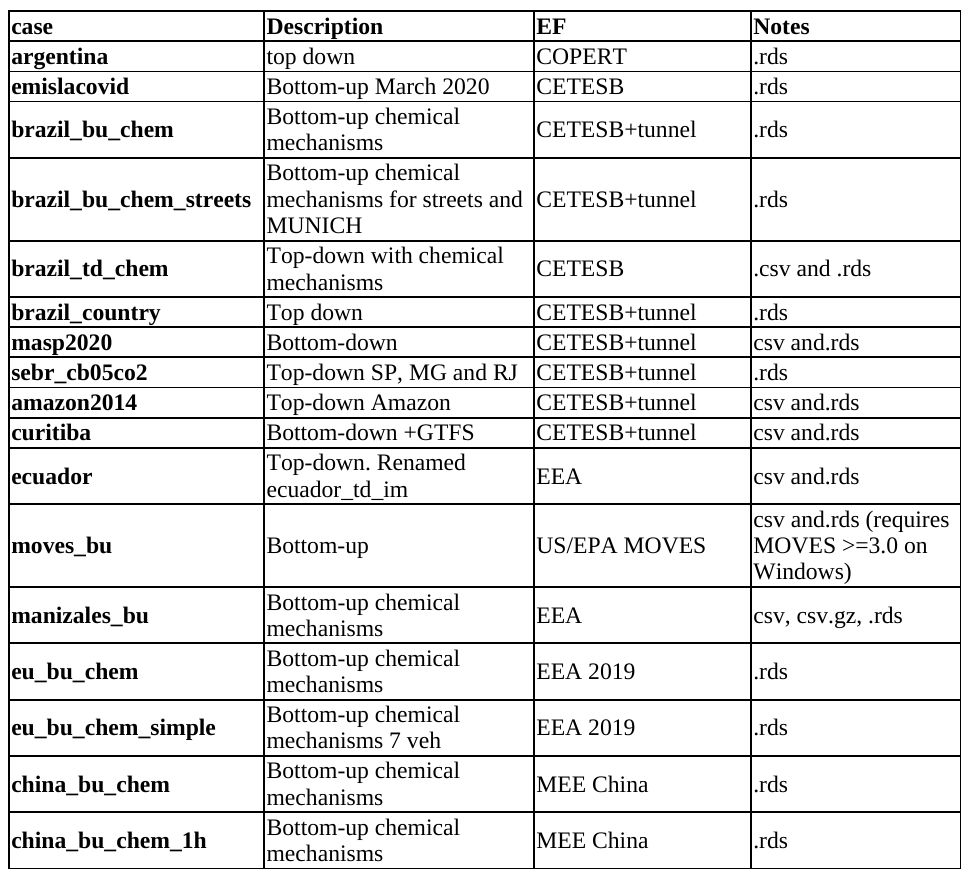
Use the function get_project and read the documentation, there you can see more projects as well.
library(vein)
awesome_city <- tempdir()
awesome_city
#> [1] "/tmp/RtmpQ9FRLO"
get_project(directory = awesome_city,
case = "brazil_bu_chem")
#> Your directory is in /tmp/RtmpQ9FRLO
system(paste0("tree ", awesome_city))
You have to open the file main.Rproj with Rstudio and then open and
run main.R
To run main.R you will need these extra packages:
If you do not have them already, you can install:
install.packages(c("ggplot2", "readxl", "eixport"))
Check the projects here
Thanks and enjoy VEIN!
If you use VEIN, please, cite it (BIBTEX, ENDNOTE):
Ibarra-Espinosa, S., Ynoue, R., O’Sullivan, S., Pebesma, E., Andrade, M. D. F., and Osses, M.: VEIN v0.2.2: an R package for bottom-up vehicular emissions inventories, Geosci. Model Dev., 11, 2209-2229, https://doi.org/10.5194/gmd-11-2209-2018, 2018.
@article{gmd-11-2209-2018,
author = {Ibarra-Espinosa, S. and Ynoue, R. and O'Sullivan, S. and Pebesma, E. and Andrade, M. D. F. and Osses, M.},
title = {VEIN v0.2.2: an R package for bottom--up vehicular emissions inventories},
journal = {Geoscientific Model Development},
volume = {11},
year = {2018},
number = {6},
pages = {2209--2229},
url = {https://gmd.copernicus.org/articles/11/2209/2018/},
doi = {10.5194/gmd-11-2209-2018}
}

If you encounter any issues while using VEIN, please submit your issues to: https://github.com/atmoschem/vein/issues/ If you have any suggestions just let me know to sergio.ibarra@usp.br.
Please, read this guide. Contributions of all sorts are welcome, issues and pull requests are the preferred ways of sharing them. When contributing pull requests, please follow the Google’s R Style Guide.
Sometimes you need to install R and all dependencies and a way for doing that is using anaconda. Well, as my system is in portuguese, after installing R using anaconda it changed the decimal character to ‘,’. In order to change it back to english meaning decimal separator as ‘.’, I added this variable into the .bashrc
nano ~/.bashrc
export Lang=C
More details on StackOverflow
Stargazers